
When configuring products, you might encounter a situation where certain groups (e.g., color, size, or material) are essential to the customization process. If no selection is made in a required group, customers can inadvertently proceed to checkout with incomplete configurations. This can lead to errors, dissatisfaction, or additional follow-ups to clarify missing details.
How it works
- A required group must have at least one selection made before the product can be added to the cart.
- If a required group is left unselected, the product is not added to the cart and a notice names the group that needs a selection.
- Sub-groups marked Required are checked the same way, wherever they sit in the configurator.
- The same check runs when a customer edits a configured product from the cart. The edit is refused and the cart item stays as it was.
- Groups with Hide Control turned on are skipped, along with everything inside them, because the customer cannot choose in them.
Marking a group as required
In the configurator editor, select the group or sub-group, tick Required in its settings, and save the configurator.
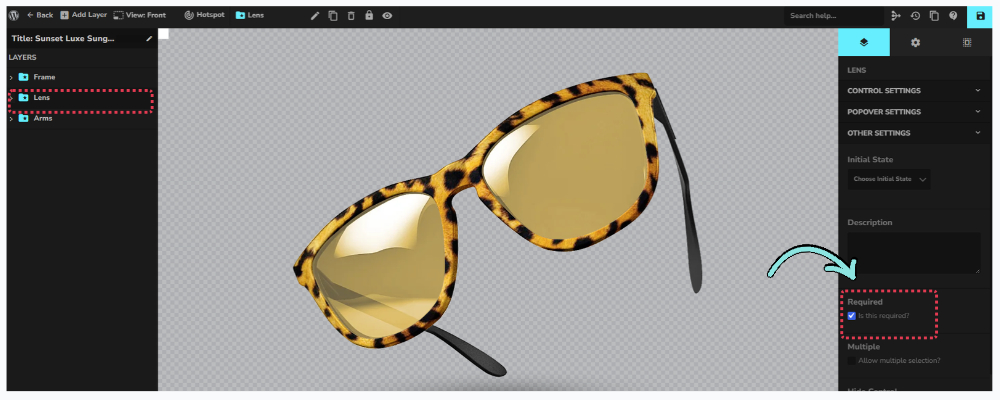
Note: You must back up your site to prevent any inconvenience during the process.
Implementing a Code Snippet to Enforce Required Groups
Our development team has created a code snippet that ensures required groups are selected before the product is added to the cart. If a customer tries to proceed without making a selection, they are shown a notification prompting them to complete their customization.
1. Install and activate the Code Snippets plugin.

2. Download the snippet with the link below and paste its code into a new snippet.
GET THE CODE HERE -> DOWNLOAD

3. Set the snippet to “Run everywhere” and activate it.
If you added the earlier version of this snippet, replace it with this one. The earlier version could let the product into the cart when another addon was active.
The error message is in English only. To change the wording, edit the text inside the configurator_required_groups_error() function in the snippet. |
Expected Outcome:
- Customers are unable to add products to the cart, or save changes to a cart item, until every required group and sub-group has a selection.
- A clear error message guides customers to complete the missing steps.
- Improved order accuracy and customer satisfaction.