
Overview
To improve performance, WP Configurator only loads its frontend CSS on pages that contain a configurator. This prevents unnecessary assets from being loaded across the entire website while ensuring that configurator pages are fully styled before rendering.
This feature uses automatic shortcode detection and page metadata to determine whether configurator assets should be loaded.
Why This Feature Was Added
Previously, configurator CSS was loaded on every page using the standard wp_enqueue_scripts hook. While this prevented layout issues, it also loaded unnecessary CSS on pages that did not contain a configurator.
To optimize performance, CSS loading was moved to shortcode initialization. However, this introduced a new issue:
- The page rendered before the configurator CSS was loaded.
- The configurator appeared briefly without styling.
- Once the CSS loaded, the page shifted into its correct layout.
This behavior is known as Cumulative Layout Shift (CLS) and can negatively affect the user experience.
The new detection system solves both issues by loading CSS only on pages that require it, while ensuring it is loaded early in the page lifecycle.
How It Works
Whenever a page is created or updated, WP Configurator automatically scans its content for a WP Configurator shortcode.
If a shortcode is found:
- A metadata flag is saved for that page.
- During page load, the plugin checks this metadata.
- If the page contains a configurator, the required CSS files are loaded in the page
<head>. - Pages without a configurator do not load the configurator assets.
This approach ensures:
- Faster loading on pages without a configurator.
- No layout shift on configurator pages.
Automatic Detection
For all newly created or updated pages, shortcode detection happens automatically.
Simply saving or updating the page will refresh the detection metadata.
No additional configuration is required.
Updating Existing Pages
Existing pages created before this feature was introduced do not automatically have the required metadata.
You have two options:
Option 1 – Re-save the Page
Edit any page containing a WP Configurator shortcode and click Update.
The plugin will automatically detect the shortcode and save the required metadata.
Option 2 – Use the Detection Tool (Recommended)
For websites with multiple configurator pages, you can update them in bulk.
Go to:
WP Admin → Configurator → Tools
Locate:
Update 2D Configurator Detection
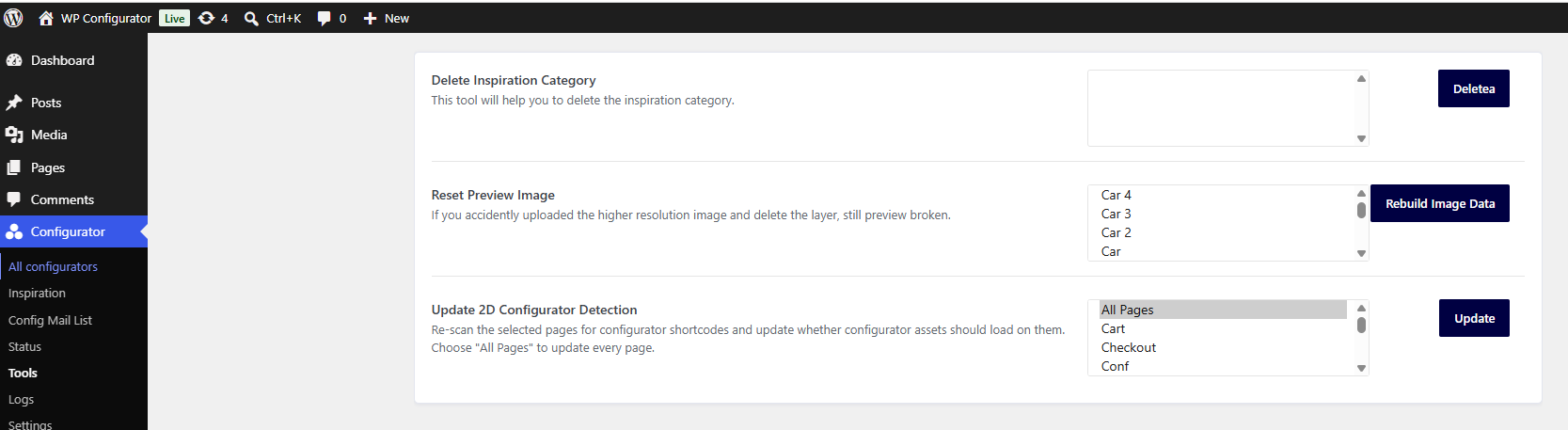
From here you can:
- Update all pages
- Update only selected pages
Click Update to scan the selected pages and regenerate the configurator detection metadata.
This process only needs to be performed once after updating the plugin.
When Should You Use the Detection Tool?
Use this tool after:
- Updating to a version that includes automatic configurator detection
- Importing pages from another website
- Migrating your website
- Restoring a website from backup
- Making manual changes that may affect configurator shortcodes
Benefits
- Loads configurator CSS only where needed
- Prevents unnecessary CSS from loading across the site
- Eliminates layout shift (CLS)
- Improves overall page performance
- Works automatically for new and updated pages
Important Notes
Important: After updating to the version that includes this feature, existing pages are not updated automatically.
To enable detection for existing configurator pages, you must either:
- Re-save each page that contains a WP Configurator shortcode, or
- Run Configurator → Tools → Update 2D Configurator Detection.
This is a one-time process. Afterward, any newly created or updated pages will automatically save the required metadata.