
If your configurator appears to jump, shift, or briefly load without styling when the page loads, this issue has been fixed in WP Configurator Pro v3.8.6.
If you’re still experiencing this issue after updating, follow the steps below to apply the fix to your existing configurator pages.
Before You Begin
Make sure you’re using WP Configurator Pro v3.8.6 or later.
Option 1: Run the Detection Tool (Recommended)
If your website has multiple configurator pages, this is the quickest way to apply the fix.
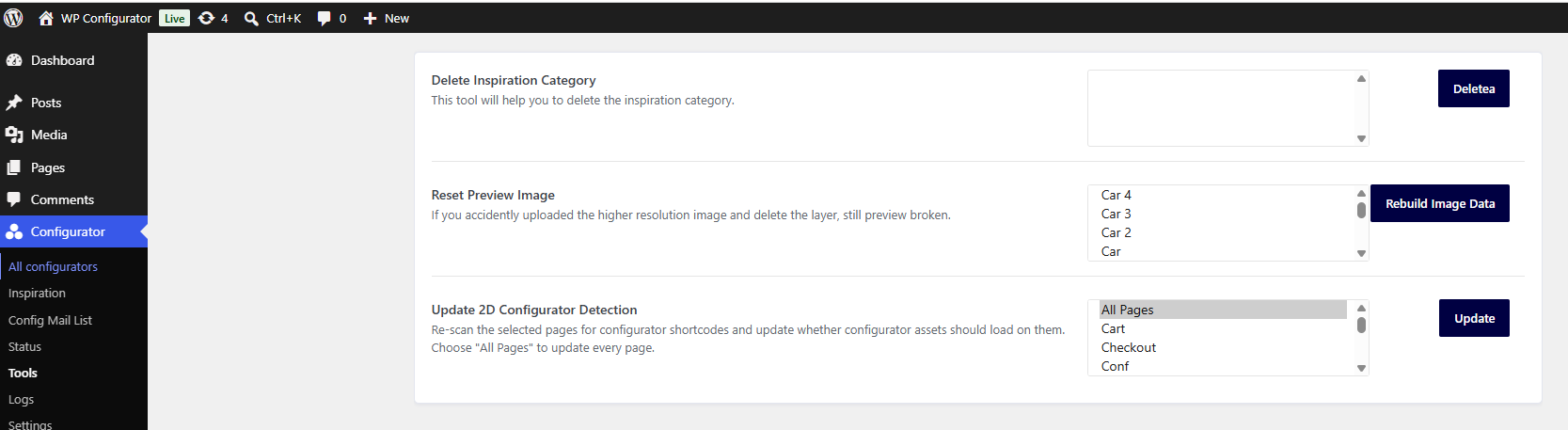
- In your WordPress dashboard, go to Configurator → Tools.
- Under Update 2D Configurator Detection, select All Pages or choose the pages you want to update.
- Click Update.
That’s it! Your existing configurator pages have now been updated.
Note: You only need to do this once after updating to WP Configurator Pro v3.8.6 or later.
Option 2: Re-save Your Configurator Pages
If you only have a few configurator pages, you can simply re-save each page.
Repeat these steps for each configurator page on your website.
Open the page that contains your configurator.
Click Update.
Check the Result
Refresh your configurator page.
The configurator should now load normally without layout shifting or delayed styling.
Still Seeing the Issue?
If the issue persists:
- Clear your website and browser cache.
- If you’re using a caching or optimization plugin, clear its cache before testing again.
- Contact our support team if you still need assistance.