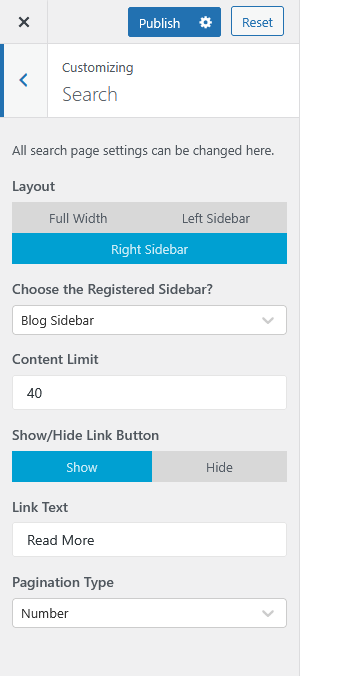
Location:
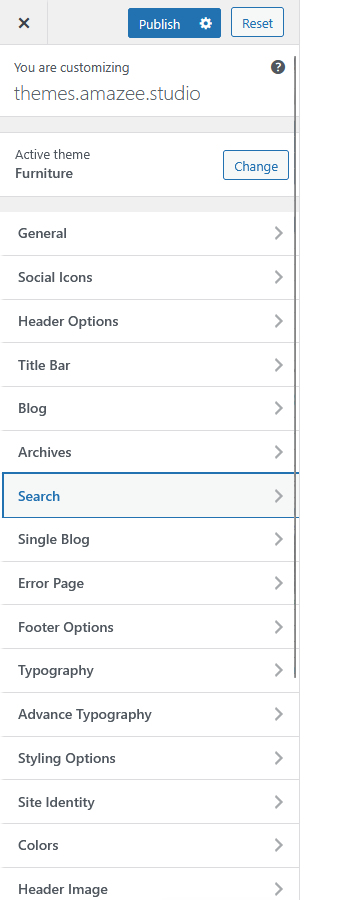
Customizer → Search
The Search panel allows you to configure the layout and design of search result pages on your website. These options give you control over how search results are displayed to visitors.
Options Overview:
Settings Description:
-
Layout
Choose the layout for search result pages:-
Full Width: Displays content across the full page width.
-
Left Sidebar: Displays a sidebar on the left side.
-
Right Sidebar: Displays a sidebar on the right side (default).
-
-
Choose the Registered Sidebar?
Select which registered sidebar to display on the search results page. Example: Blog Sidebar. -
Content Limit
Set the number of words or characters to show per post excerpt in search results. -
Show/Hide Link Button
Toggle whether to display a “Read More” link after the excerpt.-
Show: Displays the button.
-
Hide: Removes it.
-
-
Link Text
Customize the text for the link/button (default: Read More). -
Pagination Type
Choose how search results are paginated:-
Number: Displays numbered pagination links.
-
(Other types may be available depending on theme setup.)
-