
The Furniture Theme includes ready-made demo content that helps you quickly set up your website with beautifully designed layouts and sample pages. Importing the demo data allows you to replicate the look of the theme demo, so you can easily customize it to fit your brand and products.
How to Import the Demo
-
Log in to your WordPress dashboard.
-
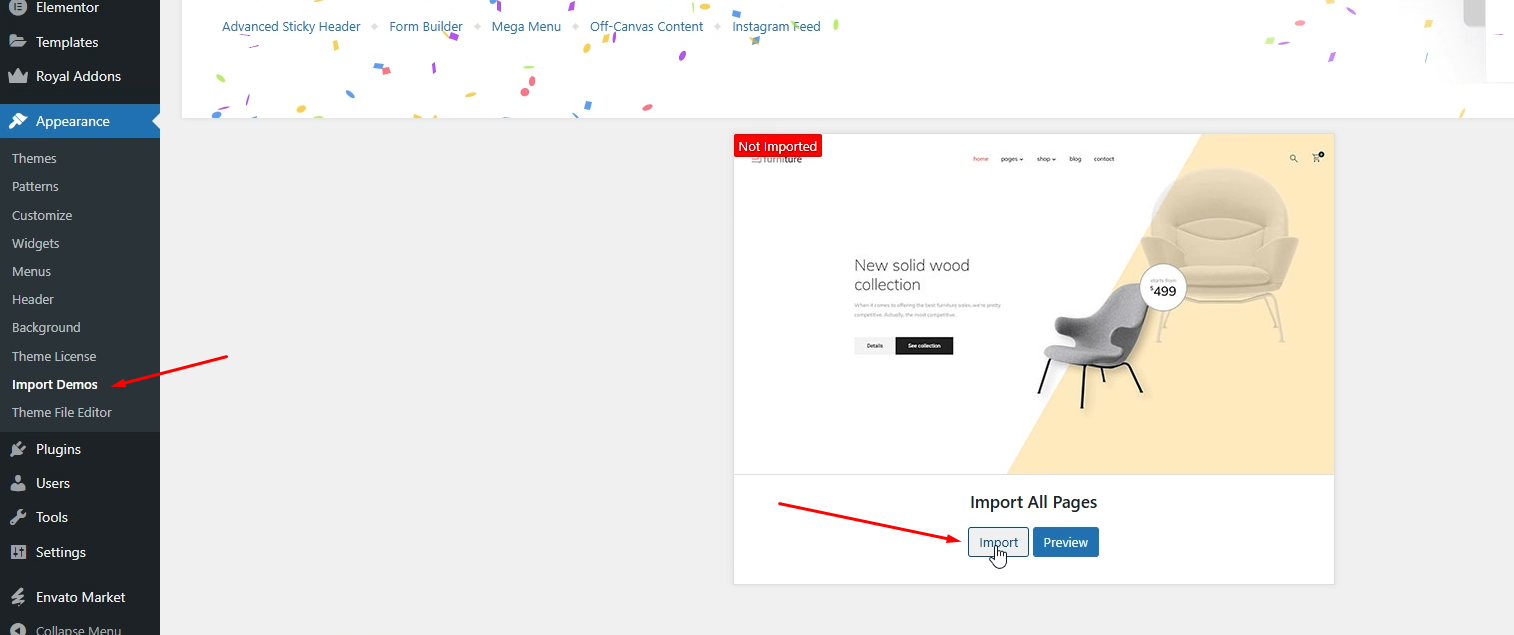
Go to Appearance → Import Demos.
You’ll see the available demo layout for the Furniture Theme. -
Hover over the demo and click Import All Pages.
-
Wait for the process to complete — this may take a few minutes depending on your server speed.
-
Once finished, your site will automatically include all demo pages, menus, widgets, and settings.
What’s Included in the Demo Import
After importing, your site will have:
-
Pre-built pages such as Home, Shop, Blog, and Contact
-
Pre-configured Header and Footer layouts
-
Sample furniture product configurator using WP Configurator Pro
-
Menus, widgets, and Elementor content matching the demo layout
This setup gives you a complete preview of your Furniture Theme design, ready for editing and customization.