
In today’s global market, offering your website in multiple languages is essential for reaching a wider audience and providing a better user experience. Multi-language support allows visitors to view your site in their preferred language, improving accessibility, engagement, and trust.
This document explains how multi-language support with WP Configurator works and how you can easily apply it to your website.
Overview
Our product configurator now supports 12 languages. This allows you to design and customize products in the language you are most comfortable with.
Supported Languages
You can now use the WP Configurator Pro in the following languages:
The supported languages are:
- Arabic (العربية)
- Chinese Simplified (中文(简体))
- French (Français)
- German (Deutsch)
- Italian (Italiano)
- Japanese (日本語)
- Polish (Polski)
- Portuguese – Brazil (Português do Brasil)
- Portuguese – Portugal (Português de Portugal)
- Russian (Русский)
- Slovak (Slovenčina)
- Spanish (Español)
When you switch the site language to any of the above, the configurator interface and contents automatically change to follow the selected site language.
How to Change the Site Language
Follow the steps below to set or change your website language:
- Log in to your WordPress Admin Dashboard.
- Go to Settings → General.
- Scroll down to the Site Language option.
- Choose the language you need from the dropdown list.
- Click Save Changes.
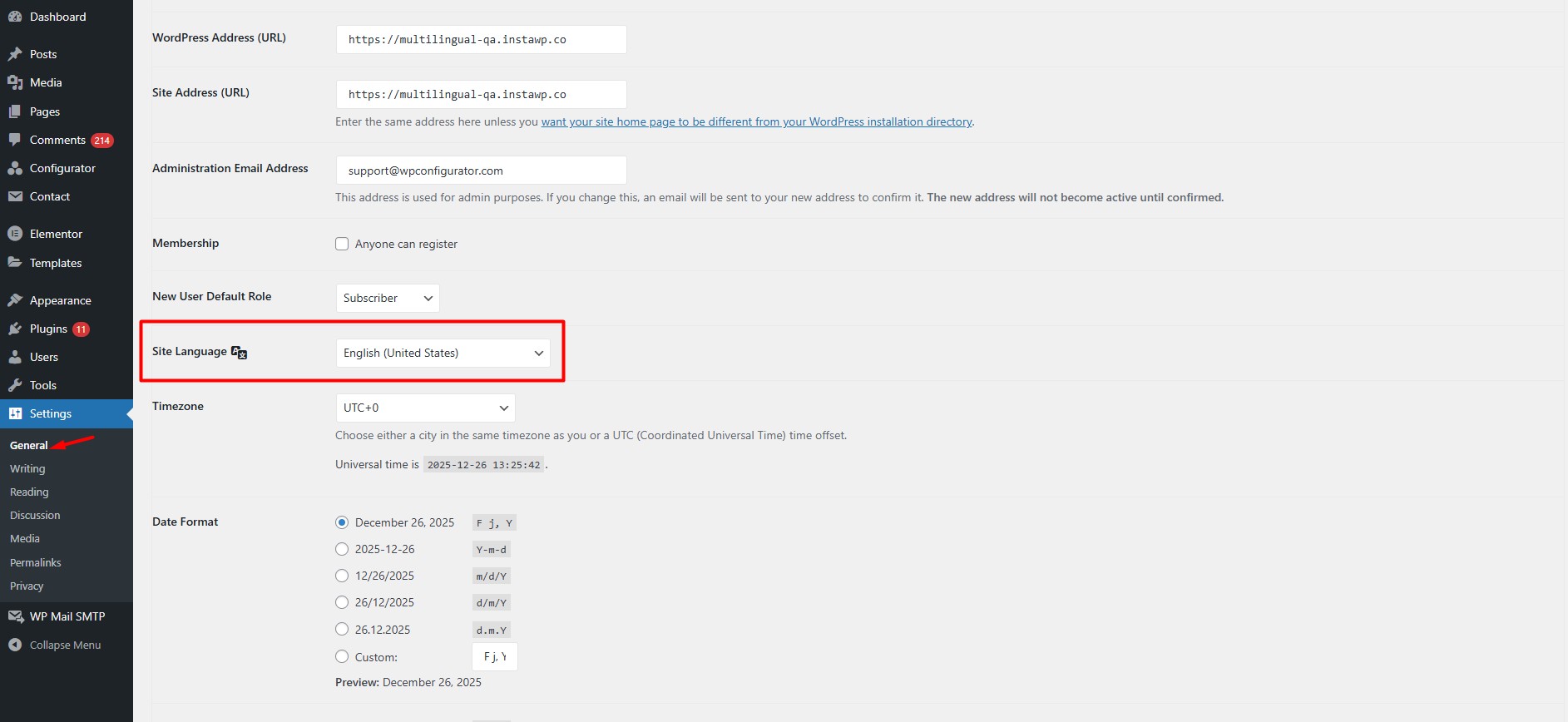
Once saved, all configurator contents on the backend editor and front end interface will apply the selected language automatically.
If you need assistance with language setup or want to extend multilingual functionality further, feel free to contact our support team.