
At WP Configurator Pro, we understand the importance of seamless integration and precise control when it comes to managing product pricing. That’s why our plugin is built to fully support WooCommerce tax settings, ensuring consistency across your online store. With WP Configurator Pro, you have the flexibility to define how product prices are displayed on the single configurator page. Whether inclusive or exclusive of tax, giving you complete transparency and control over your pricing strategy.
1. How to Enable Taxes in WooCommerce
Follow below steps to enable taxes in WooCommerce:
-
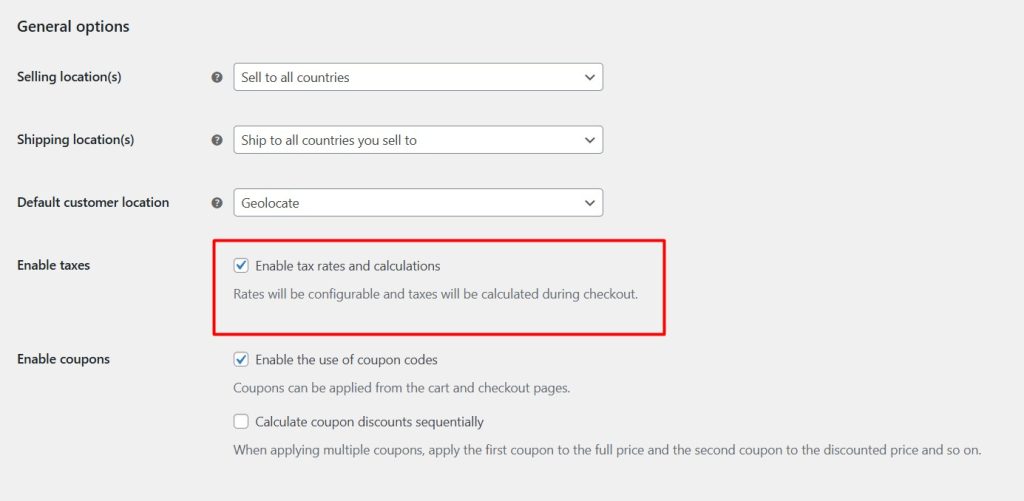
Go to WooCommerce > Settings > General.
-
Check “Enable taxes and tax calculations”.
-
Save changes.
-
Navigate to WooCommerce > Settings > Tax to configure tax rates.
-
Set up standard rates, reduced rates, or zero rates depending on your business needs.
2. Using with WP Configurator | How to display taxes on a single configurator page.
You can choose whether to include or exclude tax in the product price shown on the configurator page. This setting ensures consistency with your WooCommerce store’s pricing strategy and provides a clear pricing experience to your customers. You can show product prices including or excluding tax on the product page. Just enable/disable tax in the configurator by following these steps:
Go to Configurator → Settings → WooCommerce, then select the “Including Tax” option.
✅ Final price shown includes accurate VAT per customer’s country.
✅ Prices including VAT are available on Cart Page and during checkout of configured products.

Note: This setting affects only the configurator page. The cart and checkout will still follow WooCommerce’s tax display settings.
3. Third-Party Plugin Compatibility
We have tested the YITH WooCommerce EU VAT, OSS & IOSS plugin with WP Configurator Pro, and the integration works seamlessly:
✅ Accurate VAT calculations with custom product configurations.
✅ Compatible with dynamic pricing generated by configurator options.
✅ Smooth user experience with taxes shown on configurator pages and checkout.
⚙️ This integration ensures compliance without disrupting the product customization flow.
WP Configurator is fully compatible with the YITH WooCommerce EU VAT, OSS & IOSS plugin. It provides seamless integration with an option to enable or disable tax display and show on product page, cart page, and checkout page. This ensures that businesses using product configuration tools can remain compliant with EU VAT regulations while offering a streamlined and transparent pricing experience.
The YITH WooCommerce EU VAT, OSS & IOSS plugin enables WooCommerce store owners to:
-
Automatically apply EU VAT rules,
-
And ensure tax compliance for both physical and digital products sold within the EU.
4. Test the flow:
-
-
Go to a product page with WP Configurator.
-
Customize the product.
- Check the total price has VAT added to the basic price.
-
Add the product Cart and check the price on cart page if it is still the same
-
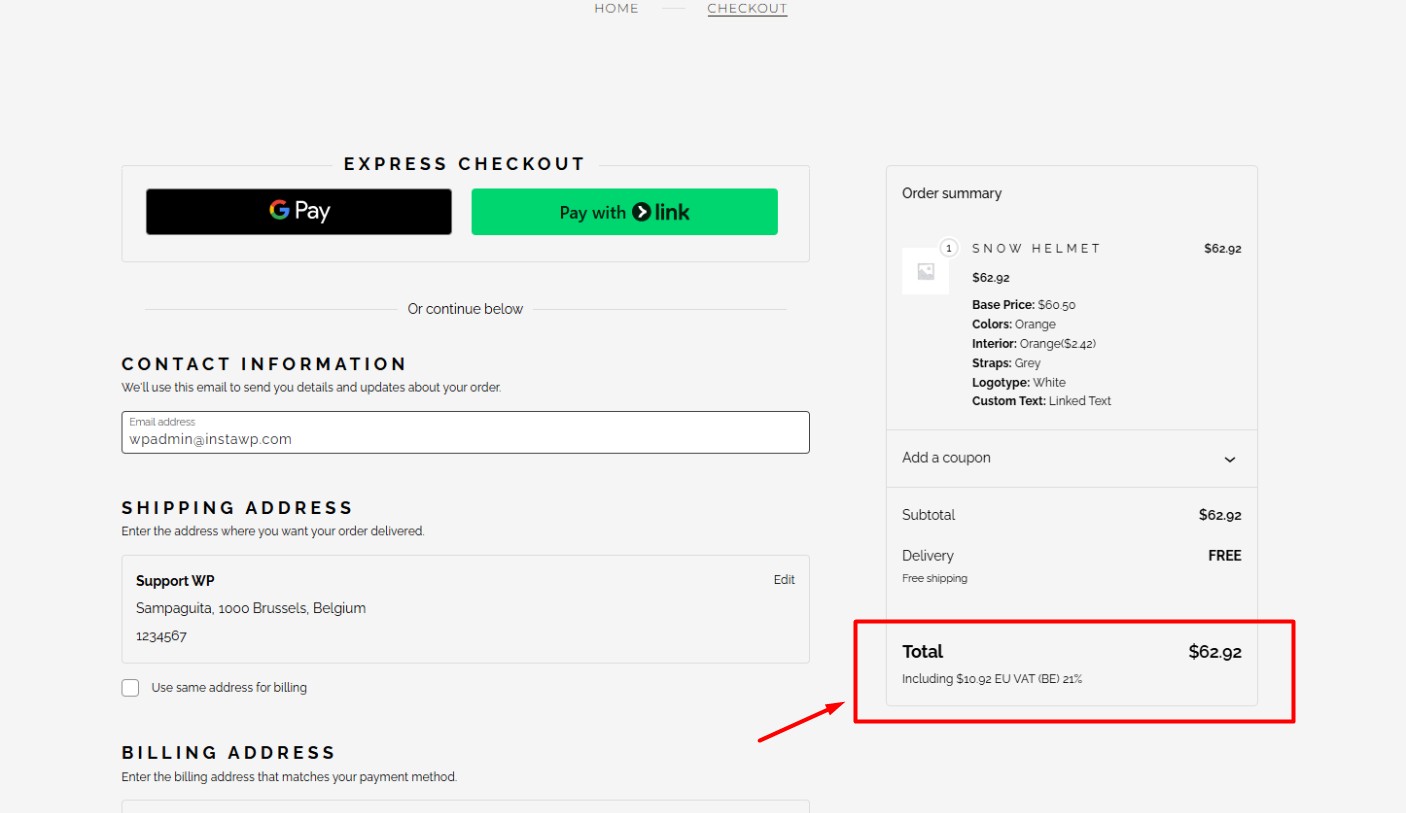
Verify VAT applied based on billing country on checkout page.
-
Support
For help or integration questions:
-
YITH Support: https://yithemes.com
-
WP Configurator Support: https://wpconfigurator.com/support