
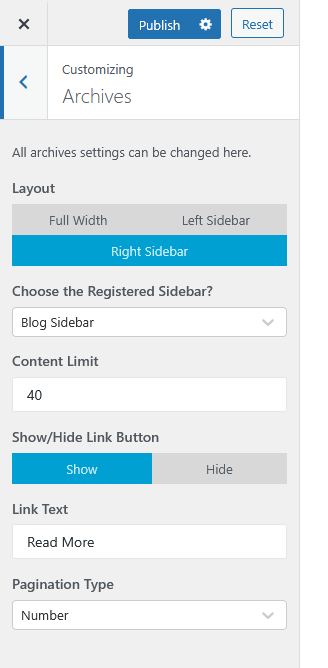
The Archives section lets you customize how your archive pages (such as category or tag listings) appear across your website. You can configure the layout, sidebar position, content display, and pagination style to best fit your design preferences.

To Access:
Go to Appearance > Customize > Archives
Available Settings:
- Layout
Choose your preferred archive page layout:- Full Width – Displays posts across the full width without a sidebar.
- Left Sidebar – Displays the sidebar on the left side of the content.
- Right Sidebar – Displays the sidebar on the right side of the content.
- Choose the Registered Sidebar?
Select which sidebar you want to display on archive pages. - Content Limit
Define the number of characters to display per post excerpt on archive pages. - Show/Hide Link Button
Toggle whether to show a “Read More” or similar link after each post excerpt. - Link Text
Customize the label for the “Read More” link. - Pagination Type
Choose how users navigate through multiple archive pages. Options include Number or Next/Previous style pagination.
Preview & Save
Once you’ve made your adjustments, click Publish to save the changes and apply them to your live site.