
How to Copy Conditions from One Configurator to Another
If you recently encountered an error after duplicating a configurator product, here’s a way to help you resolve the issue.
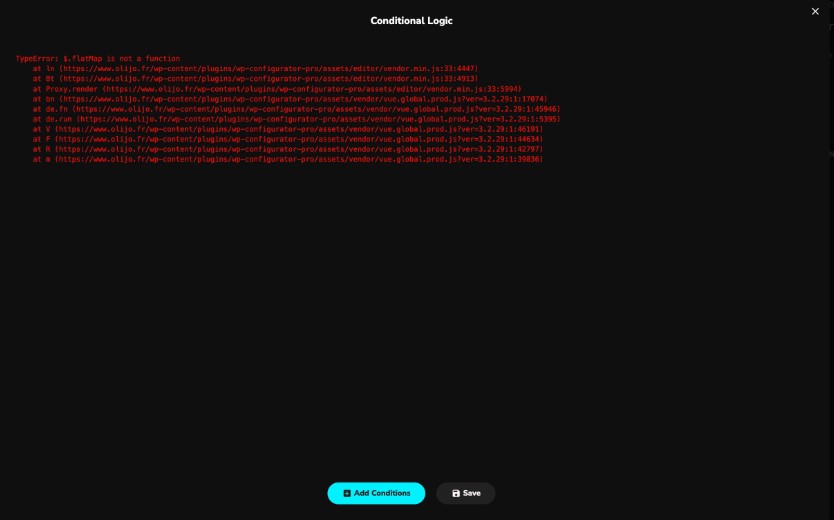
Solution: Using the Condition Copy Plugin
We have developed a plugin that allows you to copy conditions from one configurator to another. Since this plugin only copies conditions, taking a backup before copying is not required. However, we strongly recommend creating a database backup in case the wrong configurator is selected during the process.
Download & Install the Plugin
- Go to your WordPress Dashboard.
- Navigate to Plugins > Add New.
- Click Upload Plugin, then select the downloaded file.
- Click Install Now, then Activate the plugin.
How to Use the Plugin
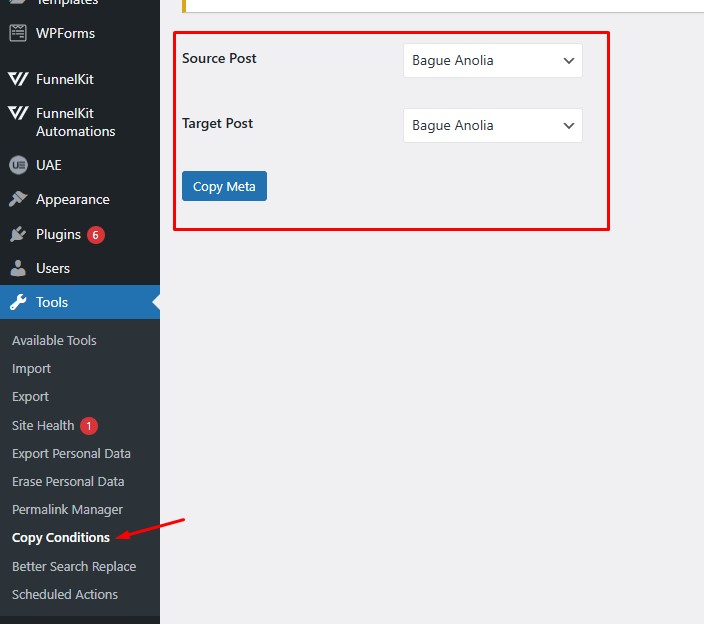
- Navigate to Tools > Copy Conditions in your WordPress admin panel.
- Select the source product (the configurator from which you want to copy conditions).
- Select the target product (the configurator where you want to paste the conditions).
- Click the Copy Meta button to complete the process.
Once done, the conditions will be successfully copied to the target configurator. If you encounter any issues, feel free to reach out for support.