
To configure dynamic range pricing for a product:
-
Open your Configurator Product
-
From your WordPress dashboard, go to Configurator Products.
-
Edit the product you want to apply range pricing to.
-
-
Add a Group Layer
-
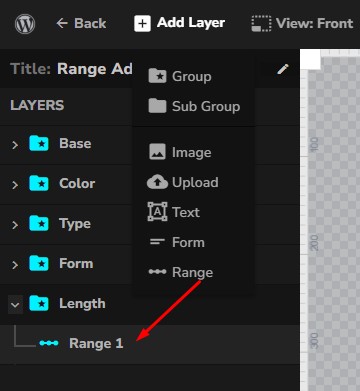
Inside the product configurator editor, click Add Group.
-
Rename the group layer (e.g. Length Selector or Width Range).
-
-
Add a Range Layer
-
Under the group layer, add a Range Layer.
-
This is where you will define the pricing rules and measurement logic.
-
Range Layer Settings
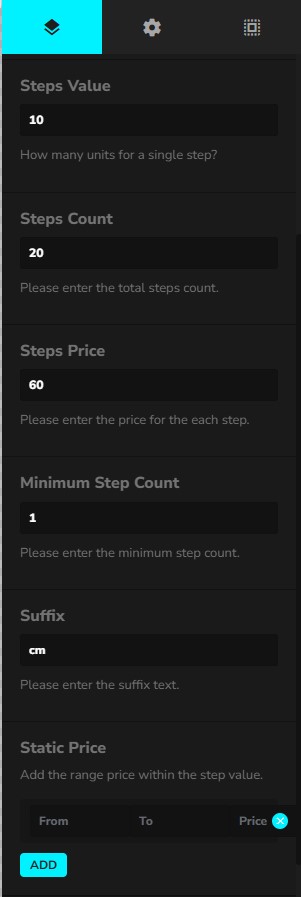
Steps Value
-
Definition: How much each step represents.
-
Example:
10 -
If your product is measured in centimeters,
1 step = 10 cm.
Steps Count
-
Definition: The total number of steps available.
-
Example:
20 -
With a Steps Value of
10 cm, the maximum range becomes:10 cm × 20 steps = 200 cm.
Steps Price
-
Definition: The price per step.
-
Example:
60 -
If a customer selects 5 steps (50 cm), the total price will be:
5 × 60 = 300.
Minimum Step Count
-
Definition: The minimum number of steps a customer can select.
-
Example:
1 -
Ensures customers cannot go below the minimum allowed.
-
With
Steps Value = 10 cmandMinimum Step Count = 1, the smallest option available will be 10 cm.
Suffix
-
Definition: A unit label shown to the customer (for display only).
-
Example:
cm -
Helps customers understand the measurement unit (cm, m, in, kg, etc.).
Static Price (Optional)
The Static Price feature lets you set a flat price for a specific range of steps, instead of multiplying by the per-step price.
-
From / To: Define the step range (e.g. 1–5 steps, 6–10 steps).
-
Price: The flat price applied when the customer selects a value within that range.
📌 Example:
-
Steps Value =
10 cm -
Steps Price =
50 -
Static Price = From
1To5→200
👉 If the customer selects between 10 cm and 50 cm, instead of paying 50–250 (per step pricing), they will pay a flat 200.
This is especially useful for:
-
Tiered pricing models (e.g. discounts for bulk purchases).
-
Flat setup fees for certain ranges.
-
Promotional pricing for specific measurement brackets.