
General Settings
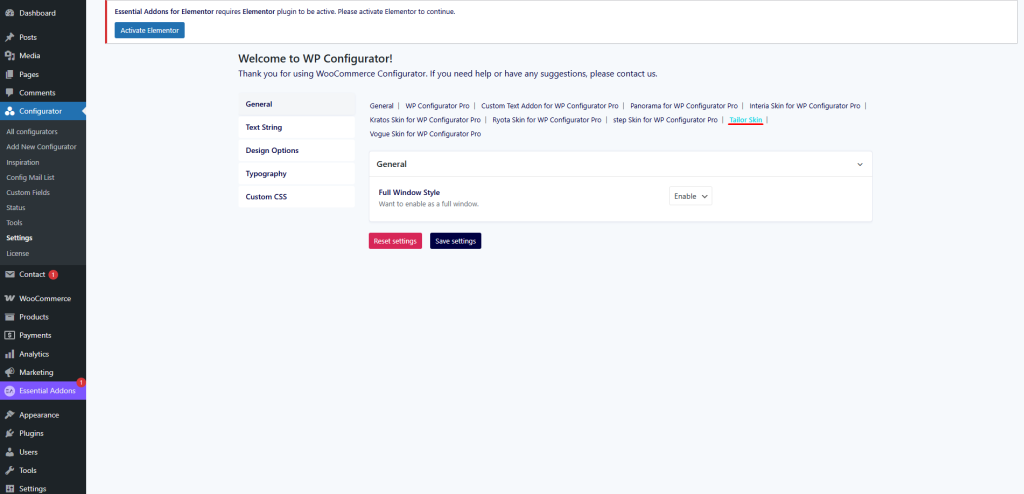
The General tab allows you to configure the global layout behavior of the Tailor Skin.
- Full Window Style
Option to enable the configurator as a full-window layout. This creates a distraction-free, immersive experience that is ideal for fashion and apparel customization workflows.
Design Options
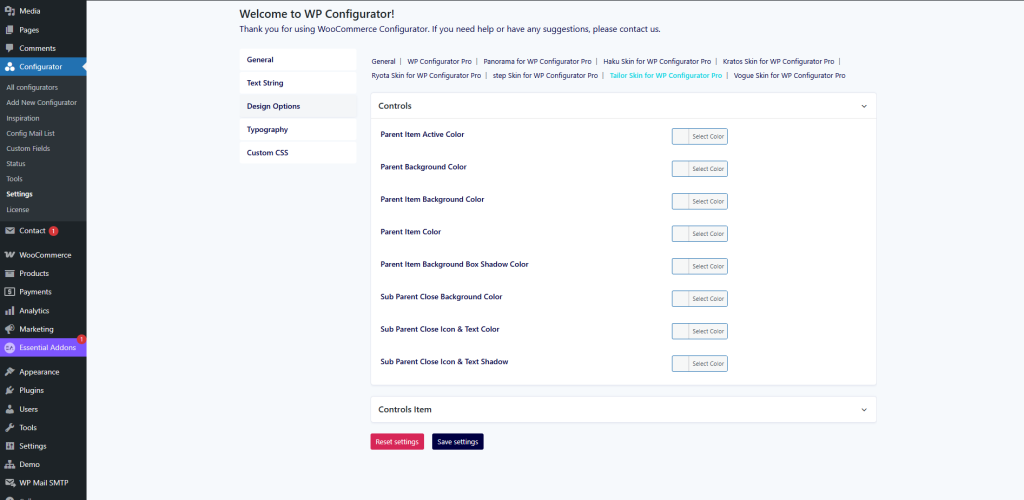
The Design Options tab allows you to style the parent and sub-parent items for a polished and professional UI.
Controls
- Parent Item Active Color
Sets the highlight color when a parent item is selected. - Parent Background Color
Defines the background color of the parent container. - Parent Item Background Color
Sets the inner background color of the parent item. - Parent Item Color
Choose the text/icon color for the parent item. - Parent Item Background Box Shadow Color
Adds shadow styling for parent item background boxes. - Sub Parent Close Background Color
Defines the background color of the close button for sub-parent items. - Sub Parent Close Icon & Text Color
Sets the color of the close icon and text for sub-parent items. - Sub Parent Close Icon & Text Shadow
Adds a shadow effect for close icons and text in sub-parent controls.
Controls Item
This section allows you to fine-tune the styling of individual control items within the configurator.